
Blackboard
Anthology Inc.Education
3.311.38K Reviews
- Version
- 11.6.1
- Installs
- 10.00M
- Age Rating
- Everyone
Screenshots
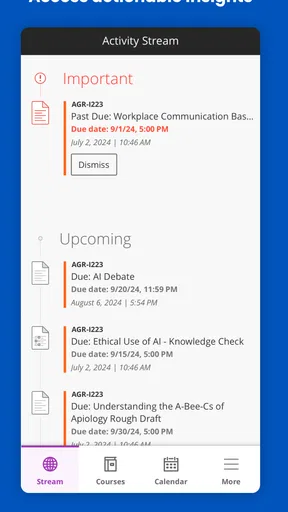
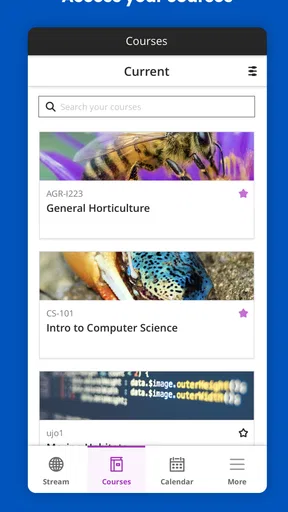
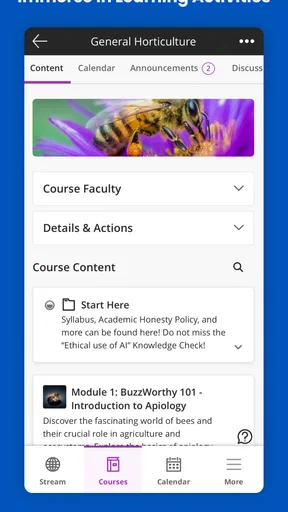
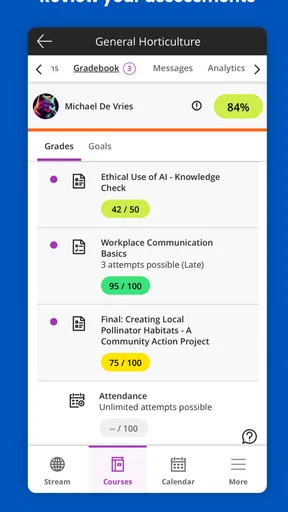
Our Review of Blackboard
 Analysis by Appyee
I found Blackboard most useful when I treated it as a central doorway to my courses rather than as a complete replacement for every study tool. It is a free education app from Anthology Inc., designed for students and other learners who need to keep track of class material, course activity, and academic communication from a mobile device. My overall view is positive but qualified: it can make a familiar learning system much easier to reach during a busy day, yet the quality of the experience depends heavily on how well an institution has organized its Blackboard courses.
The app has been available since January 15, 2015, and its current version is 11.6.1. It is intended for Everyone and requires at least iOS 11, which makes it accessible on a wide range of compatible Apple devices. With a 3.3 average from around 104 thousand ratings and more than 10 million installs, it is clearly a widely used classroom companion, although that middling score also suggests that not every student encounters the same level of polish or reliability.
What Blackboard feels like in everyday study
I find Blackboard most useful when a course check has a clear purpose: confirming where a reading lives, noticing a change, or getting oriented before class. In this section, I’ll focus on how that quick-access role shapes everyday study, including the small habit of turning course information into a separate, concrete next step rather than assuming that seeing it means it is already handled.
A practical mobile front door to a course
When I open Blackboard, I think less about “studying inside an app” and more about checking what needs my attention. That distinction matters. The app’s strongest role is helping me move between courses without opening a laptop every time I want to inspect a class area, look for new material, or confirm what an instructor has posted.
That makes it particularly handy in small moments: waiting for a bus, sitting before a lecture, or checking a course after receiving a reminder from an instructor. A desktop browser is still better for long reading sessions and detailed assignment work, but a phone is often the device I already have in my hand. Blackboard takes advantage of that reality by putting course access into a more immediate format.
The store summary calls the experience modern and delightful, but I would describe it more carefully. The interface can feel clean and approachable when a course has been arranged consistently. Clear course names, sensible folders, and current announcements make navigation fairly direct. If an instructor has placed important material in unexpected areas or left old content mixed with new content, however, the app cannot solve that organizational problem for me.
The real strength is reducing small delays
Blackboard’s best contribution is not a dramatic new way to learn. It is the removal of little barriers that otherwise cause students to postpone simple academic tasks. Checking whether a document has appeared, reviewing a notice, or confirming the location of a class resource takes less effort when the course is already available on the phone.
I also appreciate the psychological benefit of having one place to check. Students often manage several subjects at once, and the risk is not always misunderstanding the lesson; sometimes it is overlooking a message or forgetting which course contains a particular item. Blackboard gives those course spaces a common home, which can make a crowded academic week feel more manageable.
That convenience should not be confused with perfect consistency. Different institutions configure Blackboard in different ways, and instructors may use only a portion of what the platform offers. The app can expose the course structure, but it cannot make every class equally clear. In my experience, the app is most valuable when I already understand the institution’s course conventions and need quick access while away from a computer.
A realistic student workflow
Imagine a student who has a seminar in the afternoon and a deadline later that evening. Before leaving home, the student checks Blackboard on a phone to see whether the instructor has posted an updated reading or announcement. During a break, the student opens the relevant course, reviews the available material, and makes a note of what still needs attention. Later, the student uses a computer for the serious writing, returning to the app only when a quick course check is more convenient than opening a browser.
That is where I think Blackboard fits best. It is a companion for awareness and access, not necessarily the only place I would want to complete demanding academic work. The phone experience helps me stay connected to the course rhythm, while a larger screen remains more comfortable for comparing sources, drafting long answers, or handling complex files.
Three habits that make it more useful
My first practical tip is to use Blackboard as a checking routine rather than waiting until a deadline is close. A short visit after each class can reveal changes while they are still easy to handle. This is more effective than opening the app only when something feels urgent, because course information can become harder to interpret once several updates accumulate.
Second, I would separate “new information” from “work I still need to do.” A newly posted item is not automatically an assignment, and an old course area may still contain material that looks current. I found it helpful to read the surrounding context instead of relying on a title alone. This small habit reduces the chance of preparing the wrong document or overlooking an instructor’s clarification.
Third, I would use a larger device whenever the task involves sustained concentration. Blackboard is convenient for reaching a course, but convenience is not the same as comfort. Reading several pages, composing a thoughtful response, or reviewing multiple course resources is usually easier on a computer. The app works best when I give it a specific mobile job instead of expecting it to replace every part of my study setup.
Where the experience becomes frustrating
The biggest weakness is that Blackboard can feel only as polished as the course environment behind it. If one instructor uses carefully named sections and another scatters material across less obvious locations, moving between classes can feel inconsistent. That is not entirely the app’s fault, but it affects the experience all the same. Students judge the tool by how quickly they can find what matters, not by which layer caused the confusion.
I also would not choose it as my primary note-taking environment. A dedicated notes app is generally better for building a personal knowledge system, adding quick reflections, or linking ideas across different subjects. Blackboard is centered on institutional course spaces, so it makes more sense for following class activity than for creating a flexible archive of everything I learn.
Another limitation is the difference between mobile access and full academic productivity. A phone is excellent for checking information, but less suitable for detailed editing and extended reading. Students who expect a complete desktop-class workspace in their pocket may find the experience restrictive. My recommendation is to see the app as one part of a study workflow, not as the workflow itself.
How it compares with usual alternatives
Compared with opening Blackboard through a mobile browser, the dedicated app feels more natural for repeated checks. I do not have to begin by finding the correct browser tab or rebuilding the path to a course each time. That makes the app a better choice for quick access, especially when I am moving between places.
Compared with a general classroom communication app, Blackboard is more useful when the institution has already built its academic structure there. A chat-focused tool may be faster for informal conversation, while a personal notes app offers more freedom for organizing ideas. Blackboard’s advantage is its connection to formal course spaces, not its ability to replace messaging, planning, or writing tools.
That comparison also explains who should skip it. If a school or university does not actively use Blackboard, installing it will not create a useful learning environment by itself. Likewise, a learner who only wants self-directed lessons, flashcards, or language practice may be better served by an app designed specifically for that purpose. Blackboard is strongest when it matches an existing institution-led course system.
Who will get the most from it
I would recommend Blackboard to students whose institutions rely on it for course communication and materials. It is especially suitable for people who regularly move between campus, home, work, and public transport, because the mobile format makes academic checking less dependent on finding a computer.
It can also help students who struggle with remembering where course information lives. Having several subjects gathered in one app gives them a repeatable place to begin. The benefit is greatest when paired with a simple personal routine: check recent course activity, identify anything requiring action, and then move longer tasks to the device that is most comfortable.
Instructors and institutions are part of the equation too. Students will have a better experience when course areas use clear labels, avoid unnecessary duplication, and distinguish current material from older resources. Blackboard cannot compensate for confusing course design, so the platform’s success depends on thoughtful use as much as on the application itself.
What to know before installing
Blackboard is free, which removes the usual subscription decision for a student who simply wants mobile access. Its Everyone content rating also makes its intended audience broad. Still, “free” does not mean universally useful: the app becomes valuable when it connects to an active course environment that a school or university already maintains.
The developer is Anthology Inc., and the app’s large install base shows that it is established rather than experimental. I would not use popularity alone as a reason to choose it, though. The 3.3 average indicates a mixed experience, and that is consistent with the main trade-off I noticed: the app can be genuinely convenient, but its usefulness varies with institutional setup, course organization, and the kind of work I am trying to complete.
On supported Apple devices, the minimum requirement of iOS 11 keeps the technical entry point relatively approachable. Before relying on it for an important deadline, I would still make sure I can access the relevant course successfully and understand where that institution places announcements and materials. That brief orientation is more valuable than assuming every Blackboard course will look or behave the same way.
Making the switch without losing your bearings
If you are moving from a mobile browser to the app, I would treat the first session as a setup and orientation visit, not as a test of whether the whole platform is intuitive. Sign in, open each course you currently need, and note where the instructor puts the material you check most often. That small map can prevent the frustrating cycle of tapping around in a hurry when a class is about to begin.
If you have relied on paper reminders or a separate planner, keep that system in place while you learn how your courses are organized. Blackboard is useful for seeing course activity, but it does not automatically turn every announcement into a personal plan. I would copy only the actions that matter—such as a reading to finish or a question to raise—into the planning method I already trust. This avoids treating a course feed as if it were a complete picture of my obligations.
For students already using another learning platform, the key question is not whether Blackboard is better in the abstract. It is whether the institution actually maintains the courses you need there. If it does, the app can become the convenient mobile route to that material; if your class information lives elsewhere, changing habits just to use Blackboard adds effort without solving a problem. I would follow the system my instructors actively maintain rather than splitting attention across several places.
Small decisions that improve day-to-day use
One useful way to avoid wasted checking is to give each visit a purpose. I might open a course to verify a new announcement, locate a reading before class, or confirm which resource a discussion refers to. If I cannot name the task, I am more likely to browse without making progress. A focused check also makes it easier to notice when a course layout differs from the one I expected.
When material seems missing, I would first check whether I am looking in the right course and whether the instructor has identified a particular section for it. In a platform where instructors organize their spaces differently, a quick search through nearby course context is often more sensible than assuming the app has failed. If a course remains unclear, asking the instructor or course support is more productive than repeatedly reopening the same screen.
I would also be cautious about making the phone the only place I keep track of important work. Use Blackboard to find the source and understand the course context, then keep a separate reminder for any deadline or next step that you cannot afford to overlook. That division is not a criticism of the app; it is a practical safeguard against confusing access to academic information with a personal task-management system.
My final recommendation
Blackboard is a sensible mobile companion for formal education, and I would recommend it when my school or university already uses the platform. Its strongest quality is practical: it keeps course spaces close at hand and makes quick academic checks less tedious. I especially value it for staying aware of updates and moving between subjects without depending on a desktop browser.
My recommendation comes with a clear boundary. I would not choose it as a replacement for a dedicated notes app, a full writing environment, or a specialized learning app. It is also not the right download for someone whose institution does not use Blackboard. The app’s mixed rating makes sense because the mobile access can be convenient while the underlying course experience remains uneven.
My verdict is simple: Blackboard is worth installing when it is already part of your academic life, but its value comes from dependable access rather than from transforming how you learn. Used for quick checks, course awareness, and mobile access to institutional material, it earns a place on my phone. Used as the only tool for serious study, it feels less convincing. For the right student, that distinction makes it a useful everyday companion rather than an all-purpose classroom replacement.
Verdict
Strengths of Blackboard
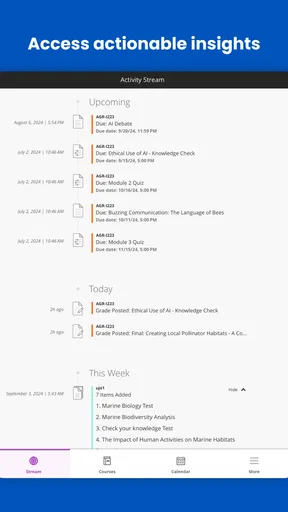
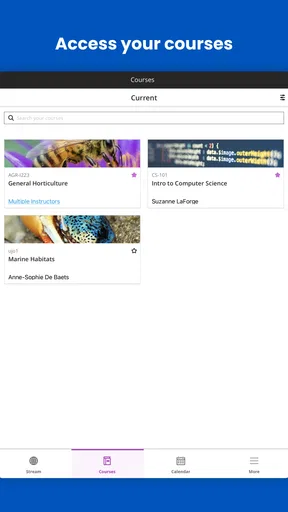
- Centralizes course materials, announcements, assignments, and grades in one place.
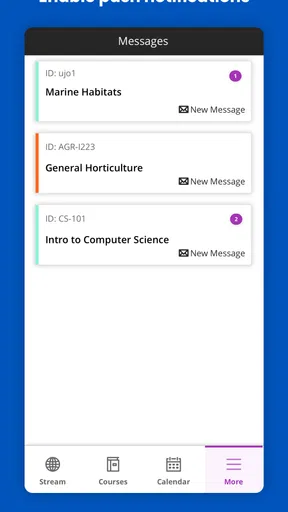
- Push notifications help students keep track of deadlines and instructor updates.
- Supports document uploads, discussions, quizzes, and other common class activities.
- Works across Android and iOS, making coursework accessible on mobile devices.
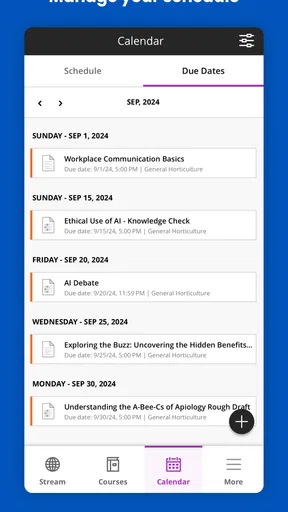
- Useful calendar and task views make it easier to organize multiple courses.
Limitations of Blackboard
- The interface can feel crowded, especially when managing several courses at once.
- Performance may vary depending on the institution’s Blackboard configuration.
- Some features require frequent navigation between separate course sections.
- Notifications can become excessive unless carefully customized in the settings.
- Mobile functionality may not match the full range of tools available on the web version.
Similar Picks in This Category
View All
Duolingo: Language Lessons
Duolingo4.7

Google Classroom
Google LLC2.8

Unacademy: Learn & Crack Exams
Unacademy3.2

Bible App for Kids
Life.Church4.4

Cake - Learn English & Korean
Cake Corp.4.7

Brainly: AI Homework Helper
Brainly4.5
Frequently Asked Questions
What is Blackboard used for?
Blackboard is a digital learning platform used by schools, colleges, universities, and other educational organizations. After signing in through a participating institution, students can view course materials, read announcements, submit assignments, take quizzes, check grades, participate in discussions, and communicate with instructors. The exact tools available depend on how the institution has configured its Blackboard courses.
Can I use Blackboard without a school or university account?
In most cases, Blackboard requires an account provided by a school, university, training provider, or another organization that uses the platform. Downloading the app alone does not normally create access to courses. You usually need your institution’s login details and may also need to select the correct school website or sign in through an institutional single sign-on system.
Does the Blackboard mobile app support assignment submissions and quizzes?
The Blackboard app can support important course activities, including viewing instructions, uploading certain assignment files, completing some assessments, checking grades, and responding to announcements. However, available features may vary by course design, Blackboard version, instructor settings, and file type. For complex submissions or exams, using Blackboard through a computer may provide a more complete experience.
Does Blackboard work offline?
Blackboard offers limited offline access rather than a complete offline learning environment. Some course content may be available after it has been opened or downloaded, depending on the institution and content format. Actions such as submitting assignments, taking synchronized quizzes, sending messages, and checking updated grades generally require an internet connection. It is best to reconnect and confirm that important work was submitted successfully.
Is Blackboard free to download and safe to use?
The Blackboard mobile app is generally free to download from official app stores, but access to its courses depends on your school or organization’s Blackboard subscription and account. For safety, install the official app published by Blackboard or its current provider, verify the sign-in page carefully, and avoid entering credentials into unofficial links. Your institution may also require additional authentication or security verification.
